
0
Windows desktop releases: 8, 8.1, 10 and 11
Spriv's patented Credential Provider adds a second factor to the Windows login screen itself, on desktops, on Windows Server and in Remote Desktop sessions. Once a user is paired, the phone confirms the login in the background, so most sign-ins look exactly like they do today.
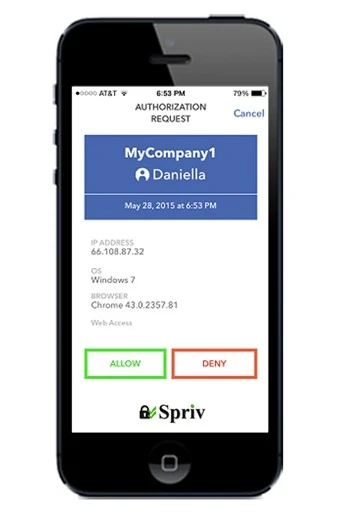
One installer covers every way a person signs in to a Windows machine, whether they are sitting at it or connecting remotely.
Local account logins on Windows 8, 8.1, 10 and 11, for laptops and workstations that hold sensitive data.
Windows Server 2012 R2, 2016, 2019 and 2022, so a stolen admin password no longer opens a server.
RDP logins to any of those machines get the same check. Adaptive MFA for RDP.
The Spriv app handles pairing, push approvals and TOTP codes on the phone your users already carry.
Username and password go in exactly as before. The Credential Provider then runs the second factor before the desktop loads.
The risk engine weighs location, device reputation, login history, behavior patterns, time of access and network characteristics.
A trusted computer-and-phone pair clears silently. Anything unusual is escalated to the phone, where the user can approve or deny with one tap.
Adaptive authentication is the default. Users can switch to another option at the login prompt when they need to.
Spriv checks that the phone's location matches the computer's. A match approves automatically; a mismatch lets the user approve or deny manually. It needs the paired Spriv app and a working internet connection on the phone.
A push notification on every login showing the username, IP address and server name, so the user can tell a real attempt from an attack before tapping.
An SMS to the user's phone, answered with "Yes" or "No". No app needed and it works in over 200 countries. Two-way SMS is billed per message.
A six-digit code from the Spriv app with a 30-second lifetime. It needs no internet or carrier signal, which makes it the fallback while travelling.
The installer runs on the machine you want to protect. Pair the users first, so nobody is locked out the moment it goes live.
Every user who logs on to the machine must exist in Spriv and have a paired phone before you install.
In the Spriv Control Panel, open Applications and download the installer that matches the Windows architecture.
Set the Service Name users see while connecting and the Login Text shown in the phone app.
Paste the API Key and API Secret from the Control Panel's Service Account section, then click Install.
Windows 8, 8.1, 10 and 11 for local accounts, and Windows Server 2012 R2, 2016, 2019 and 2022, including Remote Desktop logins to any of them.
Yes. With the computer offline, a user enters their local username and password and, if one was set during install, a Bypass Code. Logging in offline.
Yes. Each user has a status in the admin control panel: Active, Deny, Bypass or Locked, and an administrator can change it at any time.
Save the Recovery Code when you set up your account and keep at least two administrator accounts, each paired with a different phone. Account recovery options.
Uninstall "Spriv Credential Provider for Windows" from Control Panel, or boot into Safe Mode and run UnregisterFilter from the install folder. Removal guide.
The Startup plan is free for 2 users and 2 servers, with no credit card. The Business plan is $5.5/month/user with unlimited users, and servers are billed at $10/server/month. See pricing.
Two free users and two free servers, no credit card. Install in under five minutes on a desktop or a Windows Server.